
AI Baby Dance Prompt Guide - Master the Perfect Photo Prompts for 2026
Understanding how to optimize your photos for AI baby dance generators is the key to creating stunning results. This comprehensive guide covers everything you need to know about AI baby dance "prompts" - the photos that tell the AI what to create.
Understanding AI Baby Dance Prompts
Unlike text-based AI tools where you type instructions, AI baby dance generators use your photo as the primary "prompt." The photo itself contains all the information the AI needs to create the dancing animation.
How Photo Prompts Work
- Visual Analysis: AI scans your photo for body position
- Feature Detection: System identifies limbs, torso, and head
- Pose Mapping: AI creates a skeleton map of the body
- Motion Generation: Dancing movements are applied to the map
- Video Rendering: Final animation is created
Why Photo Quality Matters
| Photo Quality | Result Quality |
|---|---|
| High resolution, clear | Smooth, realistic dancing |
| Good lighting, simple BG | Clean, professional output |
| Blurry or dark | Choppy, unrealistic motion |
| Complex background | Confusing artifacts |
The Perfect Photo Prompt Formula
Element 1: Body Visibility
The more of the baby's body visible, the better the dancing animation.
Ideal: Full body from head to toe Good: Upper body with arms visible Acceptable: Head and torso Avoid: Just face or cropped body
Element 2: Lighting Quality
Good lighting is essential for AI to detect features accurately.
Ideal: Natural daylight, front-facing Good: Indoor lights, even distribution Acceptable: Slight shadows, one-directional Avoid: Dark photos, harsh shadows, backlit
Element 3: Background Simplicity
Simple backgrounds help AI focus on the baby.
Ideal: Plain white or solid color wall Good: Simple room with minimal objects Acceptable: Slightly busy but baby stands out Avoid: Complex patterns, multiple people, cluttered scenes
Element 4: Baby Position
Forward-facing positions create the best dancing animations.
Ideal: Baby facing camera directly Good: Slight angle (15-30 degrees) Acceptable: Profile with body visible Avoid: Back facing, extreme angles
Photo Prompt Templates
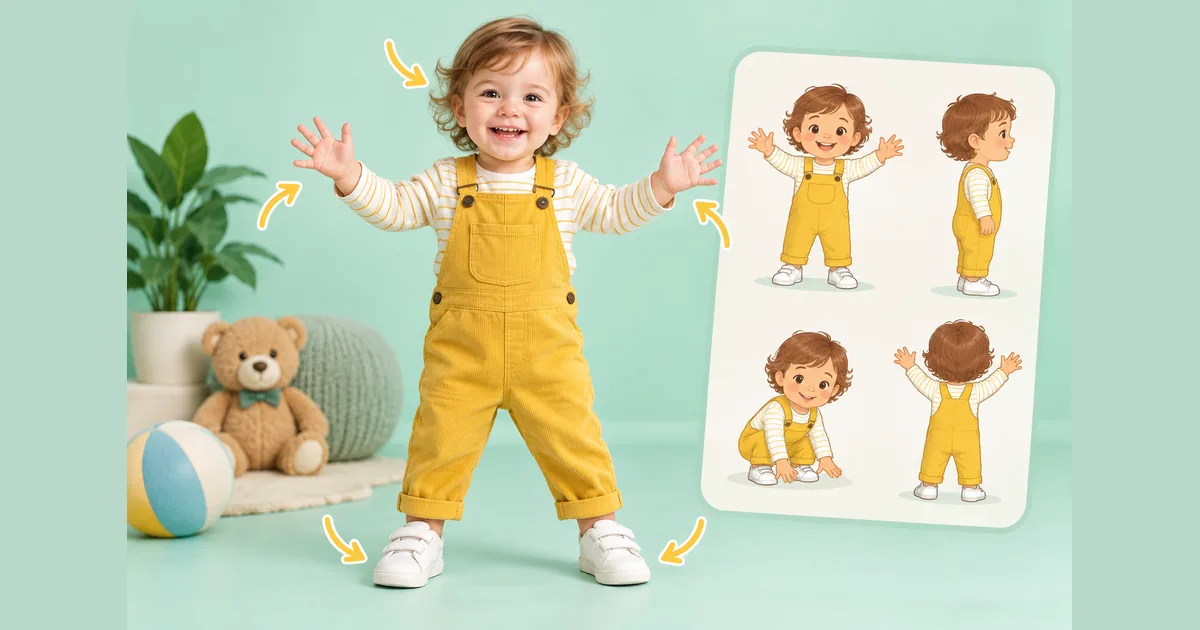
Template 1: Standing Full Body (Best Results)
Photo Setup:
- Baby standing (supported if needed)
- Full body visible head to toe
- Arms naturally at sides
- Facing camera directly
- Plain background
- Good front lighting
Expected Result: Full body dancing with arm and leg movements
Template 2: Sitting Upper Body
Photo Setup:
- Baby sitting upright
- Upper body and arms visible
- Face clearly visible
- Simple chair or floor
- Even lighting
Expected Result: Upper body dancing with arm movements and head bobbing
Template 3: Close-Up Cute Dance
Photo Setup:
- Head and shoulders visible
- Clear facial features
- Arms partially visible
- Neutral expression or smile
- Portrait orientation
Expected Result: Adorable head bobbing and shoulder movements
Advanced Photo Optimization Tips
Tip 1: Resolution Matters
| Resolution | Quality Level | Recommendation |
|---|---|---|
| 4K+ | Excellent | Best possible results |
| 1080p | Very Good | Recommended minimum |
| 720p | Acceptable | May show artifacts |
| Below 720p | Poor | Avoid if possible |
Action: Always use the highest resolution version of your photo available.
Tip 2: Clothing Contrast
The baby's clothing should contrast with the background for better detection.
Good Combinations:
- Light baby clothes + Dark background
- Dark baby clothes + Light background
- Colorful clothes + Neutral background
- Patterned clothes + Solid background (avoid vice versa)
Tip 3: Avoid These Photo Issues
| Issue | Problem It Causes | Solution |
|---|---|---|
| Motion blur | AI can't detect features | Use sharp, focused photos |
| Heavy filters | Distorts body detection | Use original, unfiltered |
| Cropped limbs | Missing body parts | Show full body/section |
| Multiple babies | Confusion in detection | One baby per photo |
| Accessories | Incorrect body mapping | Remove hats, blankets |
Tip 4: Optimal File Formats
| Format | Quality | Compatibility | Recommendation |
|---|---|---|---|
| PNG | Lossless | Excellent | Best for quality |
| JPG (high) | Near-lossless | Excellent | Good balance |
| JPG (low) | Lossy | Good | Acceptable |
| WebP | Variable | Good | Fine if high quality |
| HEIC | Good | Limited | Convert to JPG |
Real-World Photo Examples
Example 1: Perfect Photo Prompt
Scenario: Baby standing with parent support (cropped out)
- Full body visible ✓
- Natural daylight from window ✓
- Plain white wall background ✓
- Baby facing camera ✓
- Arms visible at sides ✓
- Happy expression ✓
Result: Excellent full-body dancing animation with natural movements
Example 2: Good Photo Prompt
Scenario: Baby sitting in high chair
- Upper body visible ✓
- Indoor lighting (acceptable) ✓
- Slightly busy kitchen background ~
- Baby facing camera ✓
- Arms on tray (partially visible) ~
Result: Good upper body dancing with some arm movement
Example 3: Needs Improvement
Scenario: Baby in stroller outdoors
- Full body visible ✓
- Harsh outdoor shadows ✗
- Complex background (park) ✗
- Baby facing side ✗
- Arms tucked in ✗
Result: Lower quality animation, may need retry with different photo
Troubleshooting Photo Prompt Issues
Issue: Video Looks Unrealistic
Possible Causes:
- Low resolution photo
- Poor lighting in original
- Complex background confusing AI
- Baby not clearly visible
Solutions:
- Use higher resolution photo
- Choose photo with better lighting
- Try photo with simpler background
- Ensure baby is the clear focus
Issue: Missing Body Parts in Animation
Possible Causes:
- Body parts cropped in original
- Clothing blends with background
- Arms/legs hidden behind objects
Solutions:
- Use photo showing full intended area
- Choose higher contrast clothing
- Remove obstructing objects
Issue: Weird Movements
Possible Causes:
- Unusual pose in original photo
- AI misinterpreted body position
- Blurry or unclear photo
Solutions:
- Use natural, relaxed pose photo
- Try front-facing photo
- Use sharper, clearer image
Creating the Perfect Photo for AI Baby Dance
Step-by-Step Photo Shoot Guide
Step 1: Choose the Location
- Find a spot with a plain wall
- Ensure good natural lighting
- Remove distracting objects
Step 2: Set Up the Shot
- Position baby facing camera
- Support baby if standing (parent can be cropped out)
- Ensure arms are visible
Step 3: Camera Settings
- Use portrait mode for best results
- Disable flash (use natural light)
- Set to highest resolution
- Focus on baby's face
Step 4: Take Multiple Photos
- Snap 5-10 photos
- Try slightly different angles
- Capture different expressions
- Save all at full resolution
Step 5: Select the Best
- Review all photos
- Check for clarity and lighting
- Verify body visibility
- Choose the clearest option
Frequently Asked Questions
Do I need to write text prompts for AI baby dance?
No! AI baby dance generators are fully automatic. Your photo IS the prompt. Simply upload a photo and the AI handles everything else.
What makes the best photo prompt for baby dance?
The best photo prompts have: high resolution, good lighting, simple background, full body visibility, baby facing camera, and clear features.
Can I edit my photo to improve results?
Light editing can help:
- Cropping to remove distractions
- Brightness adjustment for better visibility
- Removing backgrounds (advanced)
Avoid heavy filters, artistic effects, or over-processing.
Why did my photo get poor results?
Common reasons: low resolution, poor lighting, busy background, baby not facing camera, or body parts hidden. Try a different photo that addresses these issues.
How many credits does each attempt use?
Most platforms use 5-7 credits per generation. With AIKissVideo's 35 free credits, you can experiment with 5-6 different photos.
Next Steps
Now that you understand AI baby dance prompts, put your knowledge into practice:
- Gather Your Photos: Find your best baby photos using this guide
- Start Creating: Visit AIKissVideo.app/ai-baby-dance
- Experiment: Try different photos to see what works best
- Share Your Results: Post your creations on social media
Conclusion
Mastering AI baby dance prompts is simpler than it seems. Remember the key principles:
- High resolution photos produce better results
- Good lighting helps AI detect features
- Simple backgrounds reduce confusion
- Full body visibility enables better animations
- Forward-facing positions work best
With these guidelines, you'll consistently create adorable, viral-worthy baby dance videos. Start creating now!